Monday, May 26, 2008

Magic Music Editor V5.3.12.1 [RS

Magic Music Editor V5.3.12.1 [RS]
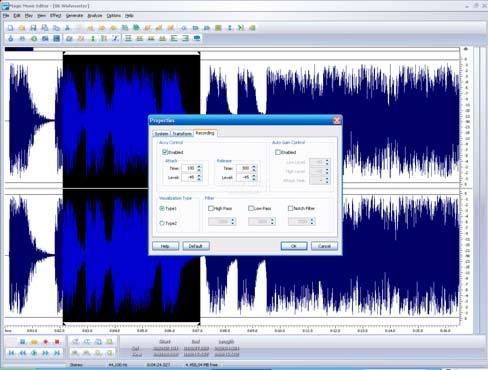


Info:

What you can do with Magic Music Editor?
Record your own music, voice or other sounds, import and export lots of audio formats, including Windows PCM (WAV), MP3, Ogg Vorbis, WMA 9 and AIFF, play it, mix it, edit audio files visually using Cut, Copy, Paste and apply more than 20 effects and filters, including: Cut, Paste, Move, Delete, Fadein/Out , Crossfade, Vibrato, Delay, Normalize, Fade, Flanger, Amplify, Invert, Insert Silence, and more.


What you can do with Magic Music Editor?
Record your own music, voice or other sounds, import and export lots of audio formats, including Windows PCM (WAV), MP3, Ogg Vorbis, WMA 9 and AIFF, play it, mix it, edit audio files visually using Cut, Copy, Paste and apply more than 20 effects and filters, including: Cut, Paste, Move, Delete, Fadein/Out , Crossfade, Vibrato, Delay, Normalize, Fade, Flanger, Amplify, Invert, Insert Silence, and more.

Features:
* Open, create, and save audio files in any of the supported formats (can also save any portion of a loaded file to disk as a new file);
* Display audio data waveform (Zoom Full, Zoom In, Zoom Out, Zoom Vertical);
* Record audio data from a microphone or any other available input device (You can record audio from DVD / VCD / CD Player, Tapes
and LPs, MP3 Player, RealPlayer, Windows Media Player, Web Page, Internet Conversation, Internet News, Internet Radio Station and more);
* Edit audio files visually (Cut, Copy, Delete Selection, Delete Silence, Paste, Paste From File, Mix, Mix From File);
* Apply various effects (Amplify, Compressor, Delay, Equalize, Fade In and Fade Out, Flanger, Invert, Normalize, Phaser, Reverb, Reverse, Silence, Shrink, Stretch, Vibrato, etc.);
* Apply different filters to any selected portion of audio files (BandPass Filter, FFT Filter, HighPass Filter, HighShelf Filter,LowPass Filter, LowShelf Filter, Notch Filter);
* Convert audio file from one format to another;
* Use marker to locate the selected part or special part of the audio data;
* Add and edit extra information to your audio files (Album, Artist, Comments, Copyright, Genre, Title, Year).

The following audio formats are supported:
* Uncompressed WAV (PCM);
* Compressed WAV (ADPCM, A-LAW, U-LAW, DSP, GSM and others).
* MP3 (MPEG Layer-3), MP2(MPEG Layer-2);
* Ogg (Ogg Vorbis)?
* WMA (Windows Media Audio)?
* CDA (Audio CD Tracks)?
* AVI (Audio Stream).
* AIFF (Apple).
* AU (UNIX).
* G.721, G.723, G.726.
* VOX (Dialogic ADPCM).
* RAW.
* MPC (MusicPack).

Code:
DOWNLOD


Password: kurdsportal.com

JetAudio 7.1.0.3100 TNTROCkZ

JetAudio is integrated multimedia software made up of a single compact rack. Not only does it play various music and video files, it also has features such as CD burning, recording, and conversion to other file formats
You can create your own Internet broadcast by using JetCast, provided with JetAudio, and you can play all major file formats, including WAV, MP3, MP3Pro, OGG, WMA, MPEG, AVI, WMV, MIDI, RM, and video and audio CD tracks. Convert among audio file formats, and record analog audio to various formats tag editing for MP3, OGG, and WMA files; sound effects including wide, reverb, and x-bass; multichannel sound output; speed control of audio playback; cross-fading for a smooth transition between two songs; a skinnable user interface; and synchronized lyrics display (karaoke) for MIDI and MP3 files.supports for video conversion for iAUDIO U3, supports ts,tp file extension, and includes video format converter to AVI. Version 7.0.5.3040 includes unspecified updates.

Download :
jetAudio 7.1.0.3100
Download : jetAudio 7.1.0.3100 Plus VX Upgrade

PhotoShop Top Secret All 4 DVD's + Bonus DVD


How to Become a Photoshop "Black Belt"-Fast!


Just released by Mark Monciardini, Photoshop® Top Secret™ is an Extreme Training Course that teaches you, step by step, how to create cutting-edge graphics and special effects with Adobe® Photoshop®. This student-friendly home study course includes four DVD-ROMs with over 16 gigabytes of video tutorials and project files. It also comes with a full-color gallery book (printed, not pdf) that shows the end result of each project in the course. You can look, learn, practice, and master these advanced techniques wherever you may be, without the need for expensive classes or tutors


DVD 1


Create Posters, Movie Covers, Surreal Graphics and More!


The course will teach you how to become the ultimate Photoshop® "black belt" for fun and/or profit. You'll learn how to create top-level special effects for eye-catching movie posters, album covers, book jackets, brochures, mailing pieces, magazine covers, article illustrations, and a tremendously wide range of print ads and Web site graphics.

Movie Poster Design I - Create a popular people montage seen on many movie posters.
Movie Poster Design II - Take an ordinary house and turn it into a Sci-fi Movie Poster.
Movie Poster Credits - Tips and tricks on creating a real “Credit Block” for movie posters.
Dark Faces - How I created my creepy Image that has been in Magazines and Ads.
Breaking Apart - Create the illusion that a face is falling apart.
Dream Scene Montage - Create an elephant with wings and place it into a futuristic world.
Stone Portrait - Create a “Stone Bust” out of a portrait for a killer special effect.
Surreal Images - Create a creamy foggy mist over water and rocks.
Dream Skin - Create a fantasy woman with henna art and dream skin.
Special Effects - Learn how to create orbs, fireballs and jellyfish like creatures.


Code:
Code:
http://rapidshare.com/users/73FHPA


DVD 2


Painting a Portrait - Digitally paint a portrait from a photographic reference.
Swapping Faces - How to take the face from one photo and place it into a completely different one.
Pop Art - Turn a Photograph into artwork that was popular in the mid 1950’s.
Applying Tattoos - How to apply henna and tattoos to skin.
Masking Fur - Seamlessly remove the background from furry animals.
Vanishing Point - What Vanishing Point is and how to edit images with perspective.
Web Graphics - Learn how to create commonly used web graphics and screen shot
Shattered Type - Create the illusion that text is being shattered like glass.
Flower Greeting Card - Use the vector tools in Photoshop to create an elegant looking Greeting Card.
Creating DVD Covers - Mark shows you exactly how he created the Photoshop Top Secret DVD covers.


Code:
Code:
http://rapidshare.com/users/VZYC2I


DVD 3


Flying out of Bounds - Create the classic “out of bounds” effect with a very cool masking trick.
Reaching out of Bounds - Creating the illusion of arms and hands reaching out of a picture frame.
Chocolate Milk Frog - How to make a frog covered in chocolate.
Covered with Wax - Choose an object and cover it with melting wax.
Grunge Look - Create a unique grunge background that can be used for almost anything.
Square Fruit - Play with mother nature by changing the shape of fruit.
Invisible Man - How to make a person vanish from their clothing.
Metal Collage - How to create a Robot with pieces of a Photo and then place it into another world.
Morphing Creatures - Morph animals and reptiles together to create interesting creatures.
Using Layer Comps - How to create multiple layouts in one Photoshop file using Layer Comps.


Code:
Code:
http://rapidshare.com/users/VWXU64


DVD 4


Vector Art Portrait - Turn a Photograph into beautiful vector art.
Dreamy Background - Create Sci-fi looking spiral backgrounds.
Liquid Metal - The ultimate Liquid metal technique that can be applied to text and objects.
Smoke - Create Psychedelic and Natural Smoke to incorporate into your artwork.
Soap Bubbles - Use soap bubbles to add flair to your projects.
Water Bubbles - Use these water bubbles to infuse imagination into your projects.
Underwater Scene - Create an underwater illusion with just the tools in Photoshop.
Swap Animal Skin - Take skin from one animal and place it over another.
Stylized Character - Turn a sketch into colorful art.
Masking Mastery - Special video that explains many masking techniques used by the pros.

Tech Info:

Video tutorials stream off the DVD-Roms using Adobe Flash technology. Videos have stereo sound and run at 12 to 15 frames per section. Stop, Play pause and video scrub controls are available at all times.


Code:
Code:
http://rapidshare.com/users/T7EETP


Bonus DVD 5


Code:
Code:
http://rapidshare.com/users/DUAPA1


Free Kaspersky Internet Security license key! Hurry!!!

The following steps will teach you how to get yourself a free license key for Kaspersky Internet Security. Please grab it as fast as possible, because we don’t know when they are going to end the promotion.

Steps:

a) Go to

Code:
http://www.kaspersky.com/de/20814_72814_329.html

and get your activation code.


b) 2. After that, paste the registration code in

Code:
https://activation.kaspersky.com/en/index.html

Left the Customer ID and Password blank. Press enter to go to the next step.

c). Click the “Download Key” button to download your free license key. You will need it to activate your Kaspersky Internet Security.

Note: You can only get 1 license key. No matter how many times you do, you will get the same license key.

How to Choosing A Good Domain Name

Choosing a domain name for your site is one of the most important steps towards creating the perfect internet presence. If you run an on-line business, picking a name that will be marketable and achieve success in search engine placement is paramount. Many factors must be considered when choosing a good domain name. This article summarizes all the different things to consider before making that final registration step!

Short and Sweet
Domain names can be really long or really short (1 - 67 characters). In general, it is far better to choose a domain name that is short in length. The shorter your domain name, the easier it will be for people remember. Remembering a domain name is very important from a marketability perspective. As visitors reach your site and enjoy using it, they will likely tell people about it. And those people may tell others, etc. As with any business, word of mouth is the most powerful marketing tool to drive traffic to your site (and it's free too!). If your site is long and difficult to pronounce, people will not remember the name of the site and unless they bookmark the link, they may never return.
Consider Alternatives
Unless a visitor reaches your site through a bookmark or a link from another site, they have typed in your domain name. Most people on the internet are terrible typists and misspell words constantly. If your domain name is easy to misspell, you should think about alternate domain names to purchase. For example, if your site will be called "MikesTools.com", you should also consider buying "MikeTools.com" and "MikeTool.com". You should also secure the different top level domain names besides the one you will use for marketing purposes ("MikesTools.net", "MikesTools.org", etc.) You should also check to see if there are existing sites based on the misspelled version of the domain name you are considering. "MikesTools.com" may be available, but "MikesTool.com" may be home to a graphic pornography site. You would hate for a visitor to walk away thinking you were hosting something they did not expect.
Also consider domain names that may not include the name of your company, but rather what your company provides. For example, if the name of your company is Mike's Tools, you may want to consider domain names that target what you sell. For example: "buyhammers.com" or "hammer-and-nail.com". Even though these example alternative domain names do not include the name of your company, it provides an avenue for visitors from your target markets. Remember that you can own multiple domain names, all of which can point to a single domain. For example, you could register "buyhammers.com", "hammer-and-nail.com", and "mikestools.com" and have "buyhammers.com" and "hammer-and-nail.com" point to "mikestools.com".
Hyphens: Your Friend and Enemy
Domain name availability has become more and more scant over the years. Many single word domain names have been scooped up which it makes it more and more difficult to find a domain name that you like and is available. When selecting a domain name, you have the option of including hyphens as part of the name. Hyphens help because it allows you to clearly separate multiple words in a domain name, making it less likely that a person will accidentally misspell the name. For example, people are more likely to misspell "domainnamecenter.com" than they are "domain-name-center.com". Having words crunched together makes it hard on the eyes, increasing the likelihood of a misspelling. On the other hand, hyphens make your domain name longer. The longer the domain name, the easier it is for people to forget it altogether. Also, if someone recommends a site to someone else, they may forget to mention that each word in the domain name is separated by a hyphen. If do you choose to leverage hyphens, limit the number of words between the hyphens to three. Another advantage to using hyphens is that search engines are able to pick up each unique word in the domain name as key words, thus helping to make your site more visible in search engine results.

Dot What?
There are many top level domain names available today including .com, .net, .org, and .biz. In most cases, the more unusual the top level domain, the more available domain names are available. However, the .com top level domain is far and away the most commonly used domain on the internet, driven by the fact that it was the first domain extension put to use commercially and has received incredible media attention. If you cannot lay your hands on a .com domain name, look for a .net domain name, which is the second most commercially popular domain name extension.

Long Arm of the Law
Be very careful not to register domain names that include trademarked names. Although internet domain name law disputes are tricky and have few cases in existence, the risk of a legal battle is not a risk worth taking. Even if you believe your domain name is untouchable by a business that has trademarked a name, do not take the chance: the cost of litigation is extremely high and unless you have deep pockets you will not likely have the resources to defend yourself in a court of law. Even stay away from domain names in which part of the name is trademarked: the risks are the same.

Search Engines and Directories
All search engines and directories are different. Each has a unique process for being part of the results or directory listing and each has a different way of sorting and listing domain names. Search engines and directories are the most important on-line marketing channel, so consider how your domain name choice affects site placement before you register the domain. Most directories simply list links to home pages in alphabetical order. If possible, choose a domain name with a letter of the alphabet near the beginning ("a" or "b"). For example, "aardvark-pest-control.com" will come way above "joes-pest-control.com". However, check the directories before you choose a domain name. You may find that the directories you would like be in are already cluttered with domain names beginning with the letter "a". Search engines scan websites and sort results based on key words. Key words are words that a person visiting a search engine actually search on. Having key words as part of your domain name can help you get better results.

Create a Shutdown Shortcut

Ever want a quicker way to shutdown XP without navigating through the start menu, or using a third party shutdown utility Here is a script that will do just that.

Right click the desktop and choose New Shortcut. Copy and paste this script or type it in.

%windir%System32shutdown.exe -s -t 0

Choose Next and name it whatever you like. I name mine OFF. Click Finished. Right click and choose properties and pick a Icon for it if you'd like. I use a wall light switch Icon. I drag mine into my QuickLaunch toolbar for one click shutdown.

Enjoy!

Illustrated C# 2008 EBOOK -adrive- FAST & EASY DOWNLOAD


728 pages-PDF


What you’ll learn
  • Details of the C# 2008 language presented in a clear, concise treatment
  • New features in the latest version of .NET, in the author’s unique visual style
  • How C# differs from and is similar to other programming languages, aiding migrating C++ and VB programmers who already know how languages work
Who is this book for?
  • Visual Basic programmers interested in moving to C#
  • C++ programmers interested in moving to C#
  • Novice programmers interested in learning C#
  • Students in introductory programming classes learning C#
Download


http://www.adrive.com/public/b7b4e0992b924b7ceaea9a4e511274334904a9213b99394c62 e96ec47a1605f9.html

C# .net Web Developer’s Guide - EBOOK -adrive- FAST & EASY DOWNLOAD


817 pages-PDF


Download

http://www.adrive.com/public/b2accf7493a33945326e0111103d46eb15b3071ba93440659b 01f0305f2e959e.html

Wireless Network Administrator-CWNA-EBOOK-adrive- FAST & EASY DOWNLOAD


674 pages-PDF


The only official study guide for CWNA Exam PW0-100


Fully authorized by the exam developers at the CWNP program, this comprehensive study guide thoroughly covers all the topics on the CWNA certification exam. Work at your own pace through a system of lessons, scenarios, and review questions to learn the material quickly and easily.
CWNA Certified Wireless Network Administrator Official Study Guide will help you prepare for the exam by showing you, step-by-step, how to implement, troubleshoot, and maintain wireless LANs. Get the only study guide endorsed by the creators of the CWNA exam and start your career as an expert wireless network administrator.
Maximize your performance on the exam by learning:
  • Wireless Standards, Organizations, and Applications
  • Radio Frequency and Antenna Fundamentals
  • Spread Spectrum Technologies
  • IEEE 802.11
  • WLAN Design Models, Topologies, and Infrastructure
  • Site Surveying and Network Planning
  • Infrastructure and Client Hardware and Software
  • Security
  • Troubleshooting
Complete Exam Coverage
  • Comprehensive details on all CWNA exam objectives
  • Review questions modeled after the real exam
  • Helpful chapter summaries and key term lists
  • Vendor-neutral coverage of wireless technologies and equipment
Download


http://www.adrive.com/public/84d70f1a03e8f4003ab944d3ec1954604c9afc3999f3d76bdf 113d109efb41c2.html

How to reset your BIOS password if you forgot it.

Here's a DOS trick for Windows 9x, that will reset (delete) your motherboard's BIOS password (aka CMOS password) without any need to open up your computer to remove the battery or mess with jumpers.

This method can come in very handy in the event you ever lose and forget your BIOS password or if you acquire used computers where the unknown previous owners had BIOS passwords set (in fact, this happened to me long ago—I was given a used computer, but there was no way I could enter the CMOS to make changes). It's important to note here that the password we are talking about is only the one that prevents a user from entering the BIOS setup at bootup, not the one that stops you from getting past the boot.

Normally, at bootup you can press a key (usually the DEL key) to access your BIOS allowing you to view it or make changes. With a password set, there is no way to enter setup. Though a password can provide a basic and very effective level of PC security, losing it can be a real headache if you don't know how to fix the problem.

The MS-DOS command that will makes this trick possible is the DEBUG command (debug itself is a utility—debug.exe—which is located in your Windows Command folder). This is not a command to be taken lightly—in other words, it's not a command to play with! You can cause serious corruption with this command and can end up not being able to even boot your computer! Debug is used to work with binary and executable files and allows you to alter (hex edit) the contents of a file or CPU register right down to the binary and byte level.

To begin debug mode, type debug at a MS-DOS prompt or you can specify a file, i.e., DEBUG FILE.EXE. There is a difference in screen output between the two methods. When you type DEBUG alone, debug responds with a hyphen (-) prompt waiting for you to enter commands. The second method, with a file specified, loads the file into memory and you type all the commands on the line used to start debug. In this tip, we will be writing to the BIOS, so the first method is the one that would be used. All debug commands can be aborted at any time by pressing CTRL/C.

Accessing BIOS with DEBUG
The basic trick will be to fool the BIOS into thinking there is a checksum error, in which case it resets itself, including the password. This is done by invalidating the CMOS and to do that we must know how to access the BIOS and where the checksum value of the CMOS is located so that we can change it. Access to the the BIOS content is via what are known as CMOS Ports and it's Port 70 and 71 that will give us the needed access. On almost all AT motherboards, the checksum is located at hexadecimal address 2e and 2f and filling the address 2e with ff is all you should have to do to invalidate the checksum.

Here's what to do if you ever need to reset the password and have no other method, and you don't want to open up your computer to remove the battery or jumpers.

Note! Do this at your own risk. I can only tell you that it has worked for me more than once and has worked for others as well. But I cannot make any guarantees. When I did this, I took a willing risk. The BIOS was Award Modular BIOS v4.51PG

Restart your computer in MS-DOS mode.


When you get to the C:\> or C:\WINDOWS> prompt, type DEBUG and press Enter.


A hyphen (-) prompt will appear waiting for you to enter commands.


Enter the following commands, pressing Enter after each one. Note: the o is the letter o and stands for OUTPUT.


o 70 2e


o 71 ff


q


After the q command (which stands for QUIT), enter Exit.


Then try to enter your BIOS at bootup. The password prompt should now be gone and you should now have full access to it again. However, you will now be at the default BIOS setttings and may want to change them to your preference. You may also want to have your drives autodetected again.
In closing, I should state that in the case of a lost BIOS password, your first step should always be to contact your manufacturer to see if a backdoor password is available that will allow you to bypass the forgotten password.

There are many sites on the net that list backdoor passwords you can try, but beware that some BIOS that are set up to lock up if you enter the wrong password more than a certain number of times, usually only 3 times!

gud luck !!!

Portable TuneUp Utilities 2008 7.0.7991 Final


Portable TuneUp Utilities 2008 7.0.7991 Final


WinApp | RS.COM | 12,7 MB
TuneUp Utilities® 2008 optimizes the performance of your computer, corrects problems and helps you to customize your system to suit your needs. It combines important aspects of system configuration, security, cleaning and maintenance under a modern interface. You can remove unnecessary files from your hard disk(s), clean and optimize the registry, tweak your internet connection settings, recover deleted files, optimize memory and more. In addition, you can analyze your system, receive automatic suggestions for potential performance improvements and view detailed hardware information. TuneUp Utilities also includes an Uninstaller, registry Editor, Task Manager and even an Undelete tool to recover files that have been deleted from the recycle bin. A very nice tool, with many features that will appeal to novice as well as advanced users. TuneUp Utilities 2008 makes Windows faster, more secure, and comfortable. All important aspects of system configuration, security, cleaning and maintenance are combined under a modern graphical user interface.

Features:

- TuneUp Utilities 2008 - Start Center
- Reliable Protection for Your Data
- Simple Hard Disk Organization
- Simple Windows Customization
- Perfect Error Correction
- Simple 1-Click Maintenance
- Optimum Start Acceleration
- Internet and Windows Acceleration
- Secure Data Rescue and Deletion
- Individual Windows styling

Your TuneUp Utilities advantages:

- NEW! Configures Internet Explorer 7, Firefox 2, Windows Media Player 11 and Office 2007
- NEW! Automatically eliminates errors in the file system
- NEW! Allows for simple clean-up of your disk drives
- NEW! Deletes sensitive data using the secure DoD 5220.22-M and Gutmann methods
- IMPROVED! Gives you intelligent tips to optimize your hardware and software
- IMPROVED! Speeds up your system startup
- IMPROVED! Scans your system for settings that might be slowing it down and corrects them
- Reliably and completely removes unnecessary applications including their registry entries
- Offers optimum Internet and system settings for every type of user
- Defragments the Windows registry
- Restores accidentally deleted files
- Speeds up your Internet connection

Download __________________

Wireless Technicians Handbook


This new second edition of the Artech House classic, Wireless Technician’s Handbook applies up-to-date knowledge of wireless communications formats to the real-world situations you encounter everyday. Featuring brand new material on such critical technologies as GPRS, EDGE, CDMA-2000, and WCDMA, this single, easy-to-understand volume collects the comprehensive information that is essential for your work in the field today. Covering dBm versus Watts, the differences between analog, TDMA and CDMA, as well as the evolution to 2.5 and 3G standards such as EDGE, WCDMA and CDMA-2000, and testing of handsets and base stations, this handy resource explains all first-tier wireless formats in clear, concise language, helping you to become more knowledgeable and productive. The book focuses on testing concepts and procedures, and types of testing equipment, including spectrum analyzers and power meters and their applications. Moreover, it reviews AMPS, CDMA, IS-136 and GSM, and includes important charts and screen shots from common test instruments. An invaluable reference for the field-based technician, the book also serves as an excellent guide for non-technical wireless professionals.

Book Info
Text applies up-to-date knowledge of wireless communications formats to the real-world situations professionals encounter every day. Features new material on critical technologies as GPRS, EDGE, CDMA2000, and WCDMA. For field engineers and technicians. Previous ed: c1999. DLC: Wireless communication systems.

Product Details

* Hardcover: 314 pages
* Publisher: Artech House Publishers; 2nd edition (July 2003)
* Language: English
* ISBN-10: 1580533574
* ISBN-13: 978-1580533577

Link

WordPress Complete: set up, customize, and market your blog


Book Description
Wordpress is a simple and powerful way to start blogging. If you're not an IT expert but want to use a state of the art blogging system to give your blog the best chance of success, while giving you the time to focus on content and your readers, WordPress is the right system for you, and this book is the right place to start. It will give you a rapid and straightforward introduction to the rich and powerful features of WordPress and get you up and running with a state of the art blog as quickly and painlessly as possible. WordPress is an open source blog engine released under GNU general public license. It allows users to easily create dynamic blogs with great content and many outstanding features. It is an ideal tool for developing blogs and though it is chiefly used for blogging, it can also be used as a complete CMS with very little effort. Its versality and ease of use has attracted a large, enthusiastic, and helpful community of users. If you want to create powerful, fully-featured blogs in no time, this book is for you. This book will help you explore WordPress showing you what it offers and how to go about building your blog with the system. You will be introduced to the main aspects of a blog - users, communities, posts, comments, news feeds - and learn how to manage them using WordPress. You will develop the skills and confidence to manage all types of content, be it text or images, on your blog, and also understand how users interact with the blog. In working through the book you'll be inspired as well as informed, and have the capability and the ideas for make your blog cutting edge and exciting to maximise its impact. From this book you'll learn about: Installing and configuring WordPress on a local development machine or a web hosting service Managing posts and comments Working with Image galleries, calendars, etc. Organising users and Communities Creating and Installing themes to control the page layout Linking to the outside world - Feeds, Syndication, and Podcasting Customising Widgets and Plugins Using WordPress as a regular CMS Written in a clear, easy to read style, the book takes you the essential tasks required to create a feature-rich blog as quickly as possible. From initial setup to customizing modules, each task is explained in a clear, practical way using an example blog developed through the book. Who this book is written for This book is a beginner's guide to WordPress, for people who are new to blogging and want to create their own blogs in a simple and straightforward manner. It does not require any detailed knowledge of programming or web development, and any IT confident user will be able to use the book to produce an impressive blog. The table of contents is: WordPress and the World of Blogging Getting Started with WordPress Choosing and Installing a Theme Blog Your Heart Out Non-Blog Content Feeds, Syndication, and Podcasting Getting the Theme Tailor-Made for You Managing Users and Building Communities Widgets and Plugins Administrator's Reference
Product Details

* Paperback: 304 pages
* Publisher: Packt Publishing (October 17, 2006)
* Language: English
* ISBN-10: 1904811892
* ISBN-13: 978-1904811893

Link